Table of Contents
Introduction
Managing Oracle redo logs is a critical task for every Oracle DBA, especially in high-transaction environments where improperly sized redo logs can lead to frequent log switches, performance issues, and unnecessary checkpoint activity. Choosing the correct redo log size helps improve database stability, optimize recovery operations, and reduce overhead on the system.
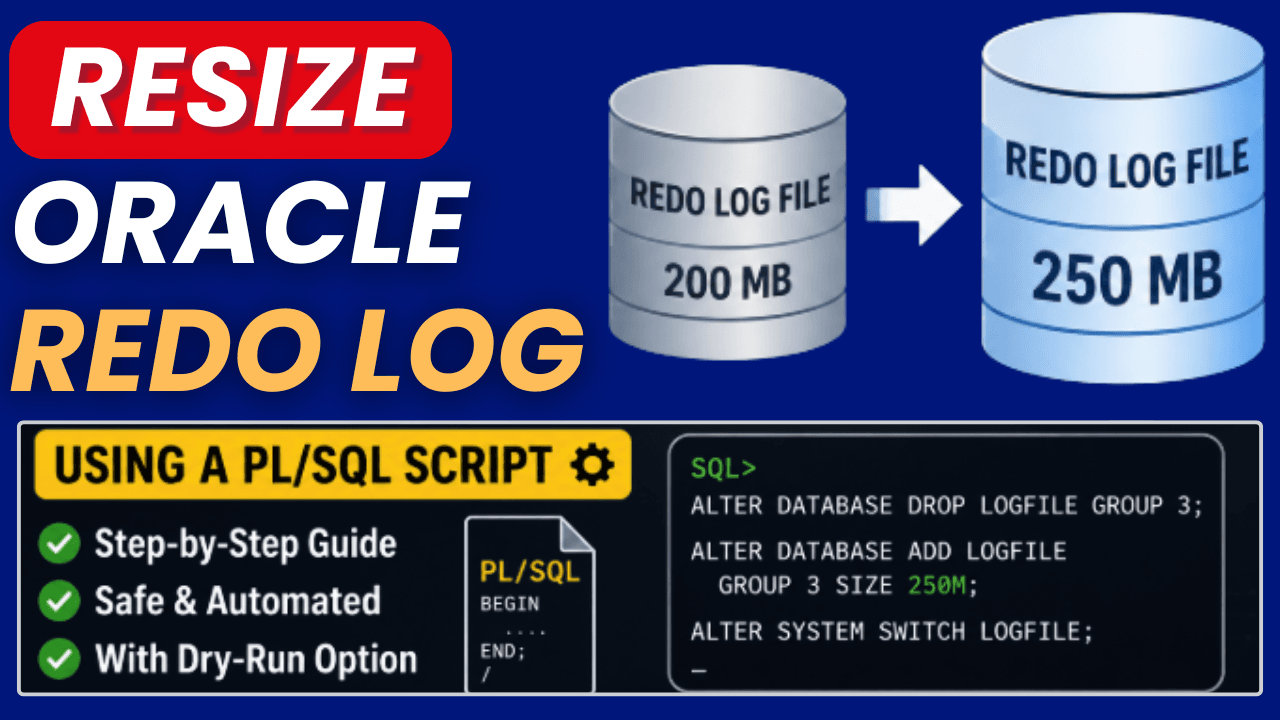
In this article, we will look at how to resize Oracle redo log files safely and efficiently in Oracle Database environments. The article explains the required steps for creating new redo log groups, switching log files, removing old redo logs, and verifying the configuration afterwards.
The guide is intended for Oracle DBAs and administrators who want to optimize their database configuration and better understand redo log management in daily operations.
Features
1. The script brings all redo log files to the same size.
2. The new size of the logfile groups can be specified in the script.
3. The script works on regular databases and on RAC databases.
4. If a redo log switch is needed, the script will do it.
5. It can be used on databases in archivelog and non-archivelog mode.
6. There is a dry-run mode that only shows the SQL commands without actually resizing the log files
7. It works with OMF and non-OMF redo log files.
Limitations
1. The script cannot be used to resize standby redo log files.
2. The script does not work in a Data Guard/Oracle Standby environment.
3. The database needs to have at least 3 existing logfile groups (per thread)
Usage
1. Connect as a database user with dba privileges (e.g., system or sys)
2. Adjust the new redo log file size in the script.
3. Maybe: Run the script with l_dryrun_on:= true to just show the commands without performing any changes on the logfiles.
4. Run the script.
5. In case of problems, you can enable debug mode (set l_debug_on to true)
6. As always, run the script on a test system first to verify if it works as intended (and let me know if it doesn’t)
Script
set serveroutput on
declare
l_red    varchar2(20) := chr(27)||'[31m';
l_green  varchar2(20) := chr(27)||'[32m';
l_yellow varchar2(20) := chr(27)||'[33m';
l_blue   varchar2(20) := chr(27)||'[34m';
l_cyan   varchar2(20) := chr(27)||'[36m';
l_reset  varchar2(20) := chr(27)||'[0m';
l_nsize number := 200; -- new redo log file size in mb
l_redo_switch_timeout number := 60; -- seconds to wait for a redo log switch in case of RAC on a remote instance
l_debug_on boolean := false; -- turn debug output on (true) or off (false)
l_dryrun_on boolean := false; -- set to true to show SQL commands without resizing the redo log files
type t_array is table of varchar2(513) index by binary_integer;
l_members t_array;
l_index binary_integer;
l_nsizeb number := l_nsize * 1024 * 1024;
l_status varchar2(16);
l_mingrps number;
l_omf number;
l_connected_instance number;
l_group_instance number;
l_message varchar2(1800 byte);
l_alert_status integer;
l_cmd varchar2(512);
begin
-- prechecks and initialization
select min(count(*)) into l_mingrps from v$log group by thread#;
if l_mingrps < 3
then
raise_application_error(-20500, 'Must have at least 3 redo log groups per thread');
end if;
select instance_number into l_connected_instance from v$instance;
dbms_alert.register('logfileswitch',true);
dbms_output.put_line(chr(27)||'[31m');
dbms_output.put_line(' ');
dbms_output.put_line('****************************************************');
dbms_output.put_line('*              REDO LOGS BEFORE RESIZE              *');
dbms_output.put_line('****************************************************');
dbms_output.put_line(' ');
dbms_output.put_line(chr(27)||'[0m');
for v_rec in (select l.thread#, lf.group#, l.bytes/1024/1024 size_mb, lf.member from v$log l,v$logfile lf where l.group#=lf.group# order by l.thread#, lf.group#) loop
dbms_output.put_line('Thread: '||v_rec.thread#||' Group: '||v_rec.group#||' Size: '||v_rec.size_mb||' MB redo log filename: '||v_rec.member);
end loop;
dbms_output.put_line(' ');
dbms_output.put_line('Target Redo Log Size: '||l_nsize||' MB ('||l_nsizeb||' bytes)');
dbms_output.put_line(chr(27)||'[31m');
dbms_output.put_line(' ');
dbms_output.put_line('****************************************************');
dbms_output.put_line('*              ACTUAL OPERATIONS                   *');
dbms_output.put_line('****************************************************');
dbms_output.put_line(' ');
dbms_output.put_line(chr(27)||'[0m');
for l_thrgrp in (select thread#, group# from v$log order by group# desc)
loop
dbms_output.put_line(' ');
dbms_output.put_line('--------------------------------------------------------');
dbms_output.put_line('Processing Group : '||l_thrgrp.group#||
                     '  Thread : '||l_thrgrp.thread#);
dbms_output.put_line('--------------------------------------------------------');
-- check if group contains OMF files
l_omf := 0;
for l_member in (select member from v$logfile lf, v$log l where lf.group#=l.group# and l.thread#=l_thrgrp.thread# and l.group#=l_thrgrp.group#)
loop
l_omf := l_omf + sys.dbms_metadata_util.is_omf(l_member.member);
end loop;
if l_debug_on then dbms_output.put_line('Group '||l_thrgrp.group#||' contains OMF files (0=no,>0=yes): '||l_omf); end if;
-- make log group inactive
select status into l_status from v$log where thread#=l_thrgrp.thread# and group#=l_thrgrp.group#;
if l_debug_on then dbms_output.put_line(l_status); end if;
if l_status = 'CURRENT' then
select instance_number into l_group_instance from gv$instance where thread#=l_thrgrp.thread#;
if l_group_instance<>l_connected_instance then -- we need to run a switch logfile on another RAC instance. alter system archive log curent is not used since it requires the database to be in archivelog mode.
if not l_dryrun_on then
dbms_scheduler.create_job(
job_name => 'switchlogfile',
job_type => 'PLSQL_BLOCK',
job_action => 'BEGIN
execute immediate ''alter system switch logfile'';
dbms_alert.signal(''logfileswitch'',''done'');
END;',
start_date => systimestamp,
enabled => TRUE);
dbms_scheduler.set_attribute(
name => 'switchlogfile',
attribute => 'instance_id',
value => l_group_instance);
dbms_alert.waitone('logfileswitch', l_message, l_alert_status, l_redo_switch_timeout);
if l_alert_status=1 then
raise_application_error(-20500, 'Timeout ('||l_redo_switch_timeout||' seconds) occured while waiting for redo log switch. You might want to increase l_redo_switch_timeout');
end if;
else
dbms_output.put_line('dryrun: alter system switch logfile; on RAC instance: '||l_group_instance);
end if;
if l_debug_on then dbms_output.put_line('performed RAC remote instance logfile switch'); end if;
else -- we run the switch logfile on the local instance
l_cmd:='alter system switch logfile';
if not l_dryrun_on then
execute immediate l_cmd;
else
dbms_output.put_line('dryrun: '||l_cmd||'; on the connected instance');
end if;
if l_debug_on then dbms_output.put_line('performed local instance logfile switch'); end if;
end if;
select status into l_status from v$log where thread#=l_thrgrp.thread# and group#=l_thrgrp.group#;
end if;
if l_status = 'ACTIVE' then
l_cmd:='alter system checkpoint';
if not l_dryrun_on then
execute immediate l_cmd;
else
dbms_output.put_line('SQL> '||l_cmd||';');
end if;
if l_debug_on then dbms_output.put_line('performed checkpoint'); end if;
select status into l_status from v$log where thread#=l_thrgrp.thread# and group#=l_thrgrp.group#;
end if;
if l_debug_on then dbms_output.put_line(l_status); end if;
-- store existing member filenames (non OMF)
select member bulk collect into l_members from v$logfile lf, v$log l where lf.group#=l.group# and l.thread#=l_thrgrp.thread# and l.group#=l_thrgrp.group# and sys.dbms_metadata_util.is_omf(lf.member) = 0;
l_index := l_members.first;
-- drop log group
l_cmd:='alter database drop logfile group '||l_thrgrp.group#;
if not l_dryrun_on then
execute immediate l_cmd;
else
dbms_output.put_line('dryrun: '||l_cmd||';');
end if;
-- (re) create log group
if l_omf > 0 then -- for log group containing OMF files
l_cmd:='alter database add logfile thread '||l_thrgrp.thread#||' group '||l_thrgrp.group#||' size '||l_nsizeb;
if not l_dryrun_on then
execute immediate l_cmd;
else
dbms_output.put_line('dryrun: '||l_cmd||';');
end if;
else -- for log groups containing only non OMF files
l_cmd:='alter database add logfile thread '||l_thrgrp.thread#||' group '||l_thrgrp.group#||' ('''||l_members(1)||''') size '||l_nsizeb||' reuse';
if not l_dryrun_on then
execute immediate l_cmd;
else
dbms_output.put_line('dryrun: '||l_cmd||';');
end if;
l_index := l_members.next(l_index);
end if;
-- add additional non OMF members
while l_index is not null loop
l_cmd:='alter database add logfile member '''||l_members(l_index)||''' reuse to group '||l_thrgrp.group#;
if not l_dryrun_on then
execute immediate l_cmd;
else
dbms_output.put_line('dryrun: '||l_cmd||';');
end if;
l_index := l_members.next(l_index);
end loop;
dbms_output.new_line;
end loop;
dbms_alert.remove('logfileswitch');
dbms_output.put_line(chr(27)||'[31m');
dbms_output.put_line(' ');
dbms_output.put_line('****************************************************');
dbms_output.put_line('*             REDO LOGS AFTER RESIZE               *');
dbms_output.put_line('****************************************************');
dbms_output.put_line(' ');
dbms_output.put_line(chr(27)||'[0m');
for v_rec in (select l.thread#, lf.group#, l.bytes/1024/1024 size_mb, lf.member from v$log l,v$logfile lf where l.group#=lf.group# order by l.thread#, lf.group#) loop
dbms_output.put_line('Thread: '||v_rec.thread#||' Group: '||v_rec.group#||' Size: '||v_rec.size_mb||' MB redo log filename: '||v_rec.member);
end loop;
end;
/
Now, let's perform a demo to understand how the script works.
Step 1) Before performing any changes, check the existing redo log groups and their sizes.
set lines 999 pages 999
select GROUP#, THREAD#,SEQUENCE#,BYTES/1024/1024 SIZE_MB, BLOCKSIZE,MEMBERS,ARCHIVED,STATUS from v$log order by GROUP#;
Output

Step 2) Prerequisites
1. Take a valid database backup.
2. Ensure at least three redo log groups exist per thread.
3. Execute the script as SYSDBA.
4. For CDB environments, connect to CDB$ROOT.
5. Test the script using dry-run mode before actual execution.
Step 3) Dry Run Mode
The script supports a dry-run mode that displays all SQL commands without making any changes.
l_dryrun_on BOOLEAN := TRUE;Step 4) Resizing Oracle Redo Log Files
Set the desired redo log size:
l_nsize NUMBER := 200;Disable dry-run mode:
l_dryrun_on BOOLEAN := FALSE;Execute the script.
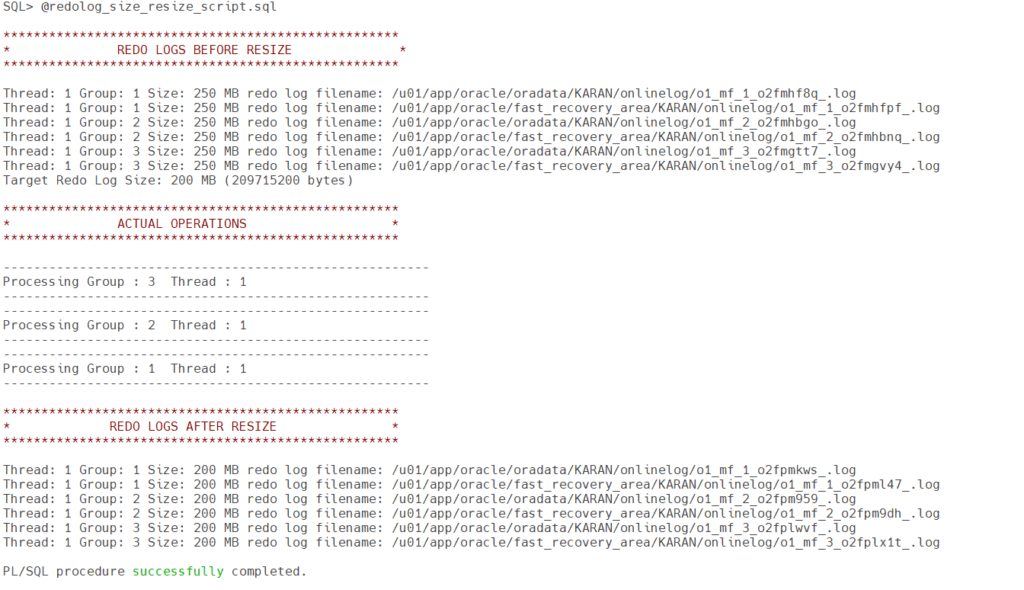
Step 5) Script Execution Output
Step 6) Check the existing redo log groups and their sizes.

Common Issues
ORA-27497: Operation Is Not Permitted Inside a Pluggable Database
This error occurs when the script is executed from a PDB.
To resolve this issue, connect to the corresponding container database and then execute the script.
Check the current container:
SHOW CON_NAME;Switch to the root container:
ALTER SESSION SET CONTAINER=CDB$ROOT;Conclusion
Properly sizing and maintaining redo logs is an important part of keeping an Oracle Database environment stable and performant. As shown in this guide, resizing redo logs can be performed safely with only a few administrative steps when planned carefully.
Regularly monitoring log switch frequency and checkpoint activity helps determine whether the current redo log configuration remains appropriate for the database's workload. Especially in larger production systems, optimized redo log sizing can contribute significantly to smoother database operation and recovery performance.
I hope this article helps simplify redo log administration and provides a practical reference for your daily DBA work.
Additional Oracle, Linux, and infrastructure-related articles are available on:
and on the technical blog:
Note: If you want to set up the Lab in your home for practice to get your hands dirty, then you can download and install Oracle VirtualBox, followed by the operating system, the Oracle binary software, and finally, create the database.