Table of Contents
Introduction
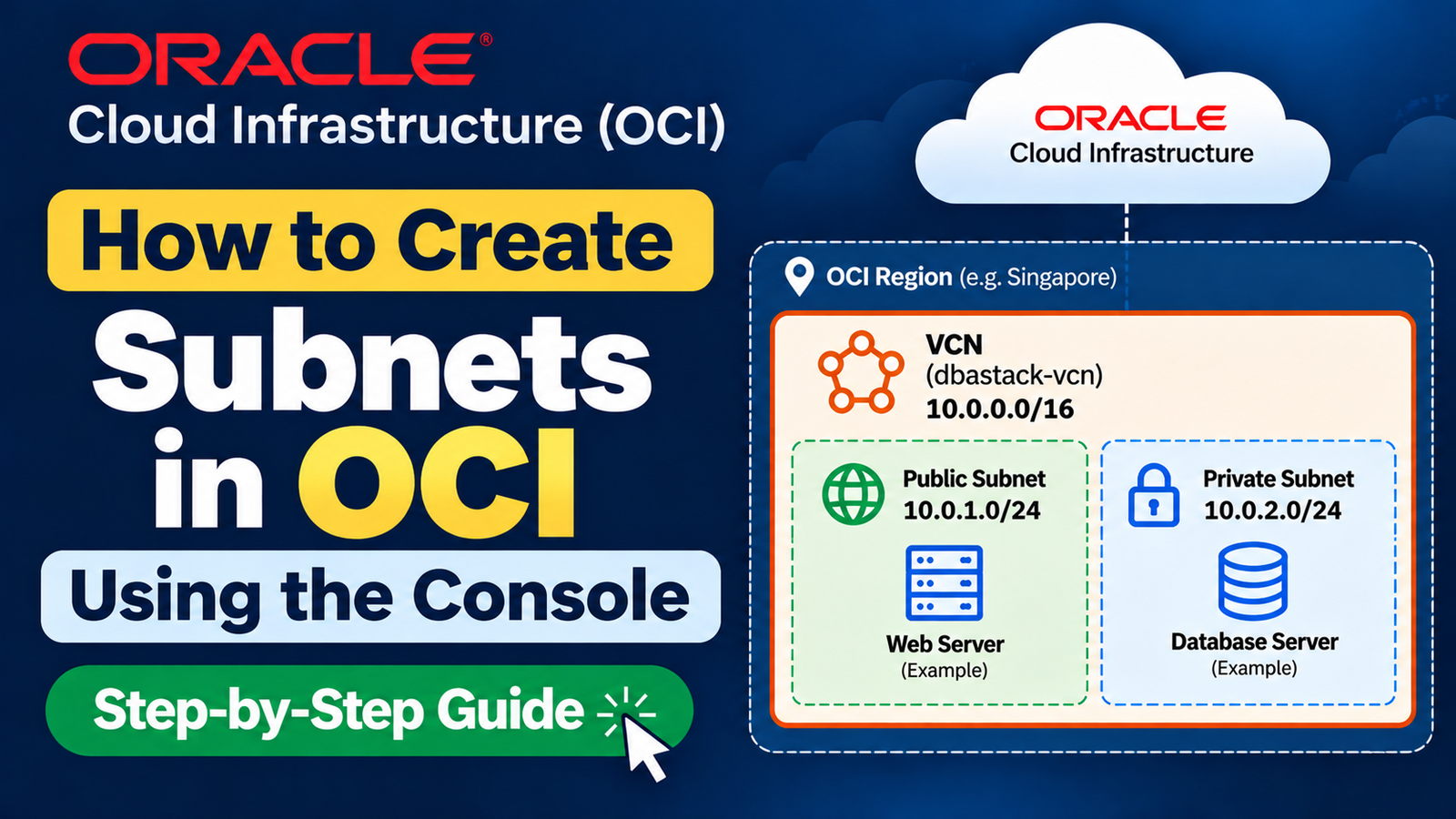
In this practical, we will learn how to create subnets in OCI using the Console step by step. We will use the Virtual Cloud Network (VCN) that we created in our previous article and configure both public and private subnets inside it.
A subnet divides a VCN into smaller IP address ranges and helps us organize resources such as web servers, application servers, and database servers.
In this hands-on guide, we will create a public subnet and a private subnet and understand subnet CIDR calculation, regional subnets, route tables, and security list settings in Oracle Cloud Infrastructure (OCI).
Public subnet: Used for resources that may require public IP addresses and internet connectivity.
Private subnet: Used for resources that should not have public IP addresses, such as database servers.
What Is a Subnet in OCI?
A subnet is a logical subdivision of a Virtual Cloud Network. It has its own IP address range and provides a network location for OCI resources.
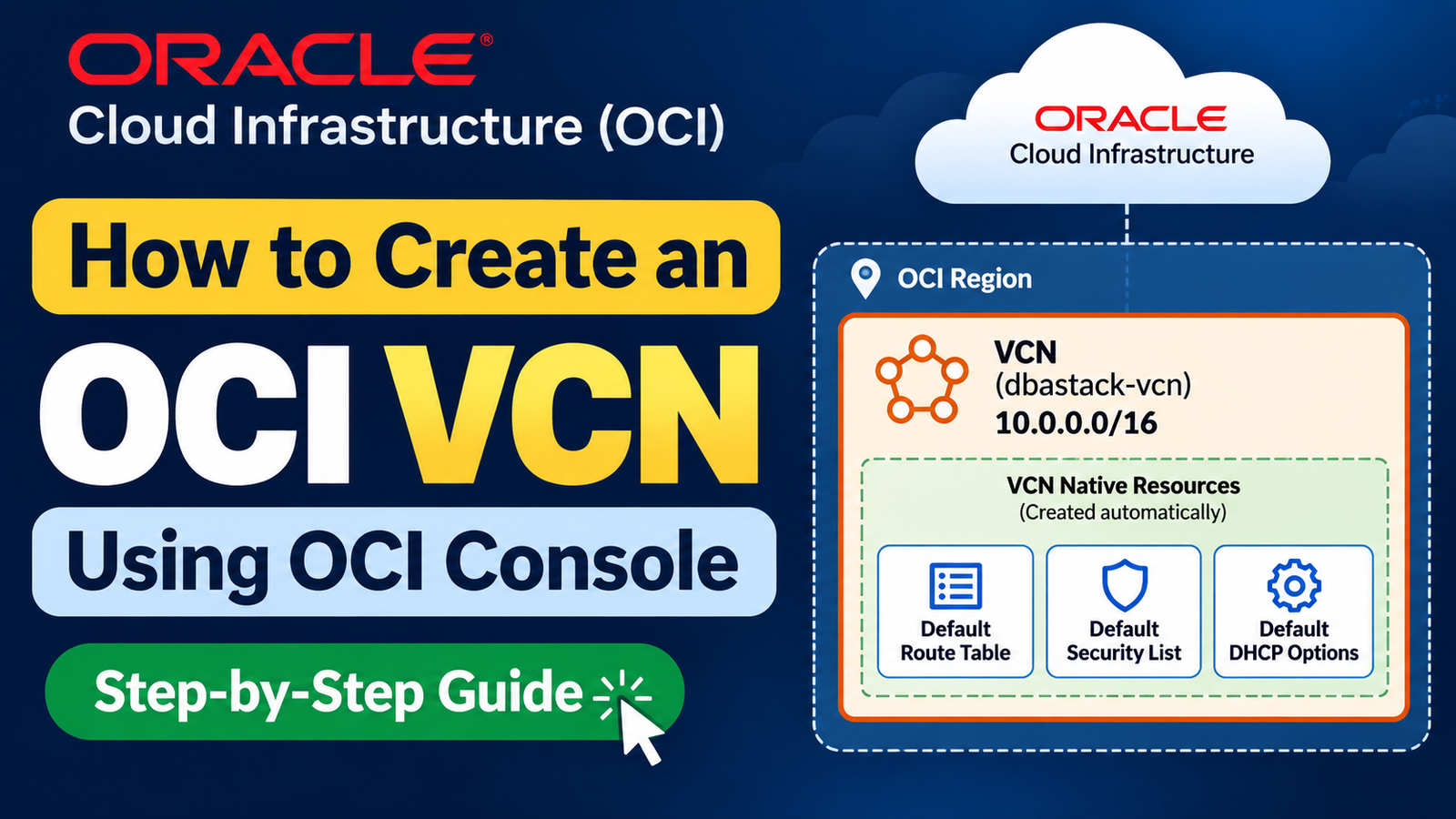
For example, we created a VCN in the previous article with the following CIDR:
10.0.0.0/16We can divide this network into smaller subnet ranges:
Public subnet: 10.0.1.0/24

Private subnet: 10.0.2.0/24
Both subnets belong to the same VCN, but we can configure their routing and security differently.
A subnet's CIDR must fall within the VCN's address range and must not overlap with another subnet in that VCN.
Official reference: Creating a Subnet
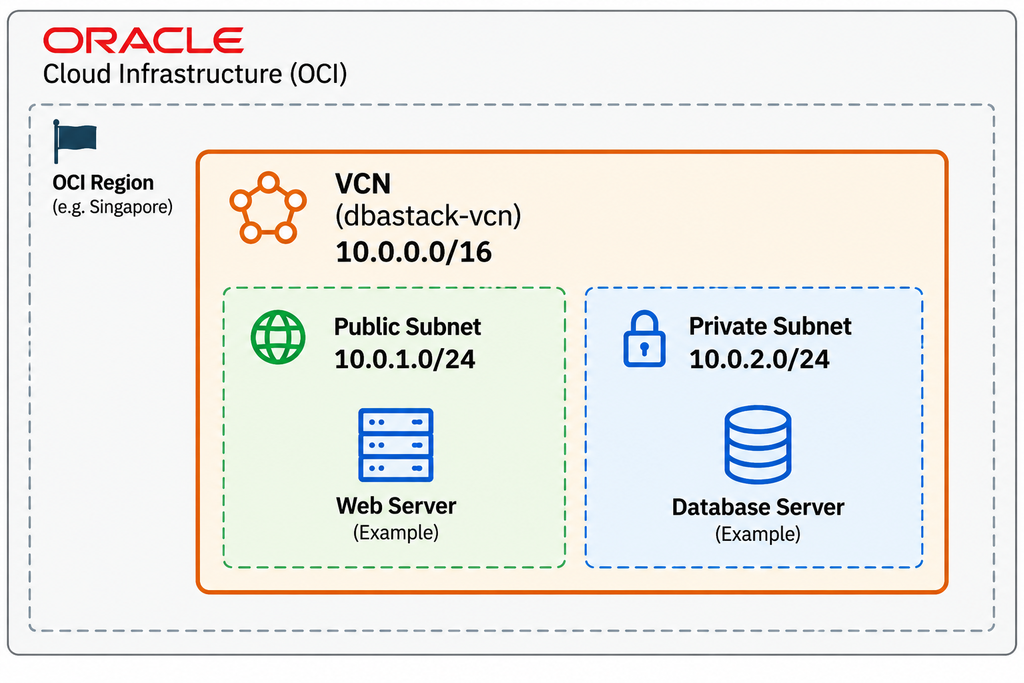
This is our planned architecture. In this article, we will create only the two subnets. We will configure gateways, routing, and Compute instances in separate practicals.
Prerequisites
Before starting, make sure you have:
1. An active OCI tenancy.
2. Access to the OCI Console.
3. Permission to create networking resources.
4. An existing VCN.
5. Planned CIDR ranges for the subnets.
For this practical, we will use the VCN created in our previous article.
| Parameter | Value |
| Region | Singapore (example) |
| Compartment | Network |
| VCN name | dbastack-vcn |
| VCN CIDR | 10.0.0.0/16 |
| Public subnet | dbastack-public-subnet |
| Public subnet CIDR | 10.0.1.0/24 |
| Private subnet | dbastack-private-subnet |
| Private subnet CIDR | 10.0.2.0/24 |
| Subnet type | Regional |
Note: Use your own region and compartment if they are different.
How to Calculate CIDR for OCI Subnets
Before creating a subnet, we need to understand how its CIDR determines the number of available IP addresses.
CIDR stands for Classless Inter-Domain Routing. It represents an IP network and its prefix length.
For example:
10.0.1.0/24Here:
10.0.1.0 represents the network address.

/24 represents the prefix length.

IPv4 addresses contain 32 bits.
Calculate the number of IP addresses
Step 1: Calculate the host bits
32 - 24 = 8 host bits.Step 2: Calculate the total addresses
2⁸ = 256 total IPv4 addresses.Therefore, 10.0.1.0/24 contains 256 total addresses.
OCI reserves three IPv4 addresses in each subnet, so the number available for resource assignment is lower than 256.
For our lab, we will use /24 for each subnet. This gives us a straightforward example with enough address space for a small lab.
Why are we using different CIDRs?
Our VCN uses:
10.0.0.0/16We will create:
Public subnet: 10.0.1.0/24

Private subnet: 10.0.2.0/24
Both ranges fall within the VCN CIDR, and neither overlaps with the other.
Important: When planning a production network, check your existing on-premises network, other VCNs, disaster recovery networks, and future connectivity requirements before selecting a CIDR.
For more information, refer to Oracle OCI Networking Documentation
You can use this link for CIDR calculation.
Public Subnet vs Private Subnet in OCI
Let's understand the difference before creating the subnets.
| Feature | Public Subnet | Private Subnet |
| Public IP address | Can be assigned when permitted | Cannot be assigned to its private IPs |
| Internet connectivity | Possible with appropriate configuration | Outbound access can use a NAT Gateway |
| Typical use | Public-facing web server or load balancer | Application server or database server |
| Route table | Commonly routes internet-bound traffic through an Internet Gateway | Commonly routes internet-bound traffic through a NAT Gateway when outbound access is needed |
| Security rules | Required | Required |
Important: Creating a public subnet does not automatically provide internet connectivity. You must also configure an Internet Gateway, an appropriate route rule, public IP assignment where needed, and suitable security rules.
Similarly, a private subnet does not automatically have outbound internet access.
Now, let's see how to Create Subnets in OCI using the Console step-by-step guide.
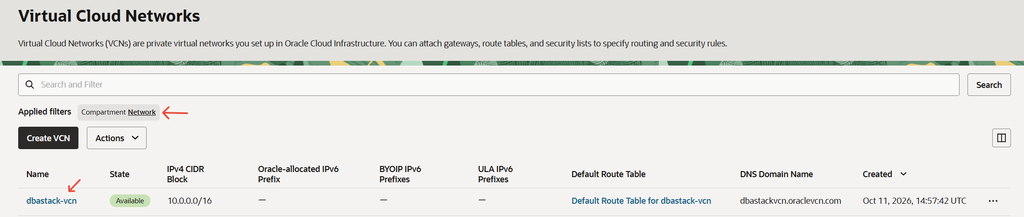
Step 1) Open the Existing VCN
Log in to the OCI Console.
From the navigation menu, select:
Networking → Virtual Cloud NetworksSelect the correct compartment and open the VCN:
dbastack-vcnVerify that the VCN CIDR is:
10.0.0.0/16If you have not created this VCN yet, complete our previous practical first:
How to Create an OCI VCN Using OCI Console
Step 2) Open the Subnets Section
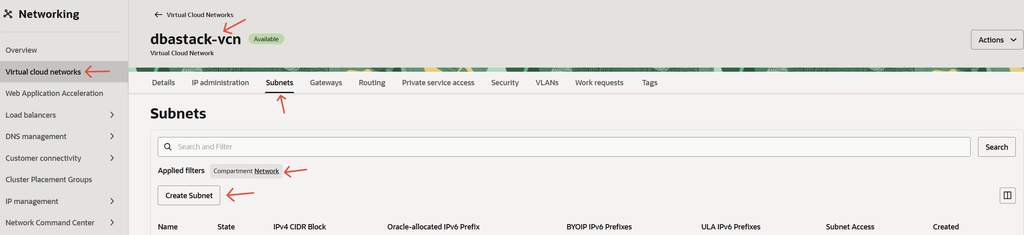
On the VCN details page, find the Subnets section.
Click Create Subnet.
OCI will display the subnet creation form.
We will use this form twice: first to create the public subnet and then to create the private subnet.
Step 3) Create the Public Subnet
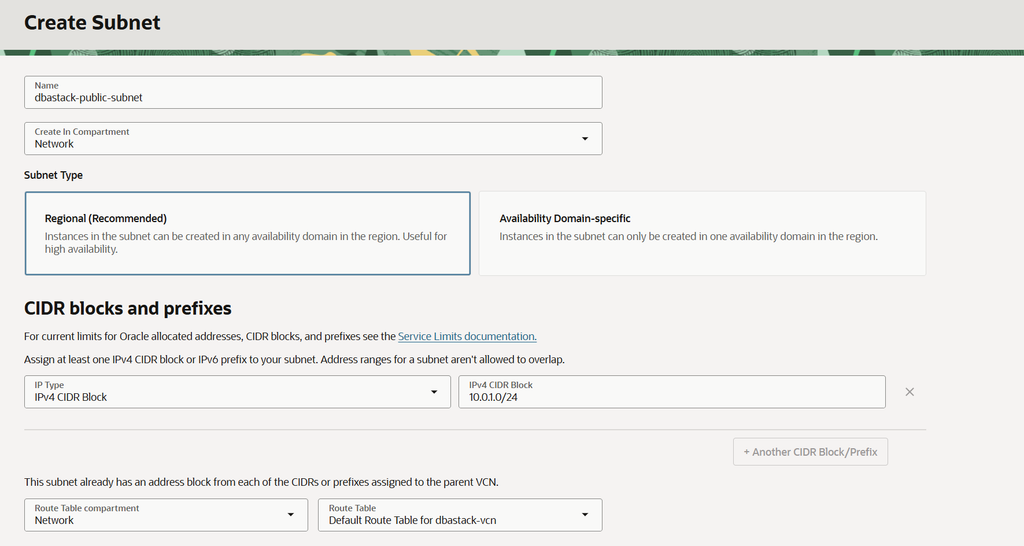
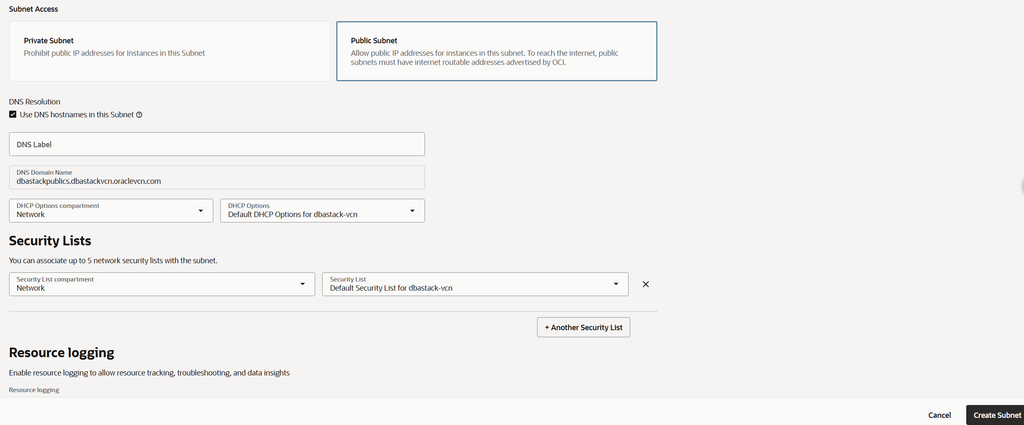
We will first create the public subnet.
Click Create Subnet and enter the following details.
| Field | Value |
| Subnet name | dbastack-public-subnet |
| Compartment | Network |
| VCN | dbstack-vcn |
| Subnet type | Regional |
| IPv4 CIDR block | 10.0.1.0/24 |
| Route table | Default route table |
| Subnet access | Public subnet |
| DHCP options | Default DHCP options |
| Security list | Default security list |
The exact order and labels of the fields may vary slightly with OCI Console updates.
Why choose a regional subnet?
A regional subnet can support resources across availability domains in the selected OCI region. Regional subnets are generally recommended for new OCI network designs.
Why choose a public subnet?
A public subnet permits public IP addresses to be assigned to eligible private IPs, subject to the applicable OCI settings and permissions.
However, creating this subnet does not automatically assign a public IP address to a Compute instance or provide internet connectivity.
What about the route table and security list?
For this initial lab, we are associating the default route table and default security list.
The default route table does not automatically contain a route through an Internet Gateway. We will configure internet routing in a separate practical.
Review the configuration and click Create Subnet.
Step 4) Verify the Public Subnet
After creation, return to the Subnets section of dbastack-vcn.
You should see:
dbastack-public-subnetCheck the following:
a) Subnet name is correct.

b) CIDR block is 10.0.1.0/24.

c) Subnet type is Regional.

d) Subnet access is Public.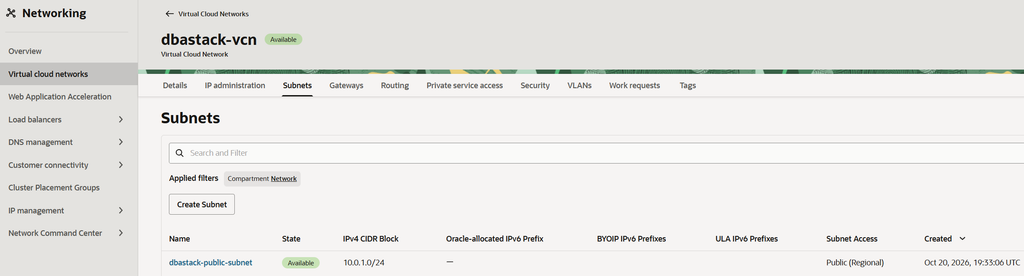
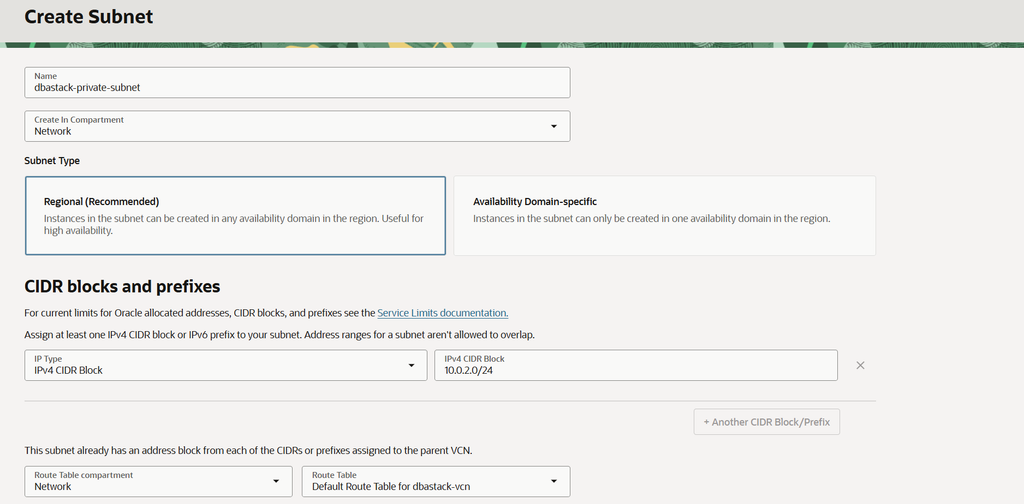
Step 5) Create the Private Subnet
Now we will create a private subnet for internal workloads, such as database servers.
Return to the VCN details page and click Create Subnet again.
Enter the following details.
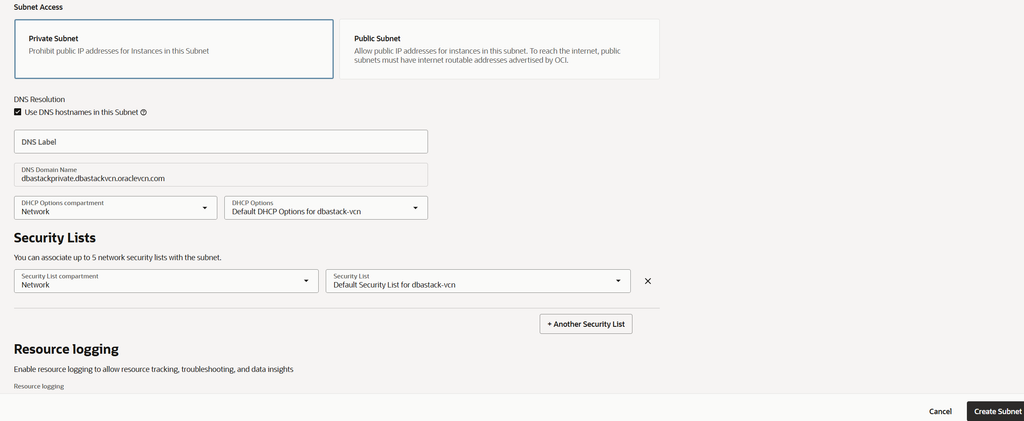
| Field | Value |
| Subnet name | dbastack-private-subnet |
| Compartment | Network |
| VCN | dbstack-vcn |
| Subnet type | Regional |
| IPv4 CIDR block | 10.0.2.0/24 |
| Route table | Default route table |
| Subnet access | Private subnet |
| DHCP options | Default DHCP options |
| Security list | Default security list |
Why choose a private subnet?
A private subnet prevents its private IP addresses from receiving public IP addresses.
This is useful for database servers and backend workloads that should not be directly exposed to the internet.
However, a private subnet alone is not a complete security solution. You must also configure appropriate routing, security rules, and administrative access.
Why use 10.0.2.0/24?
We already used 10.0.1.0/24 for the public subnet. Therefore, we use 10.0.2.0/24 for the private subnet to avoid overlapping address ranges.
Review the settings and click Create Subnet.
Step 6) Verify Both Subnets
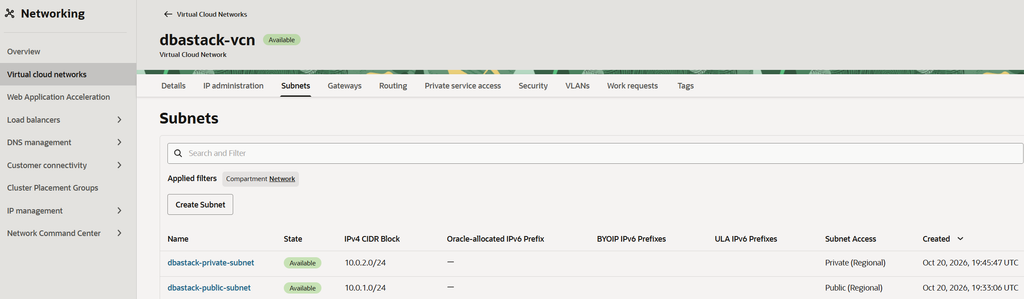
After creating the private subnet, return to the Subnets section of your VCN.
You should now see both subnets.
| Subnet name | CIDR | Type |
| dbastack-public-subnet | 10.0.1.0/24 | Public |
| dbastack-private-subnet | 10.0.2.0/24 | Private |
Verify that both subnet names and CIDR ranges are correct.
Also review the route table and security list associated with each subnet.
Understanding Route Tables and Security Lists
After creating the subnets, it is important to understand two networking components.
Route tables
A route table contains rules that determine where traffic should go when its destination is outside the directly connected network.
For example, a public subnet normally needs a route rule similar to this for internet-bound traffic:
| Destination CIDR | Target |
| 0.0.0.0/0 | Internet Gateway |
This rule requires an Internet Gateway to exist in the VCN.
A private subnet commonly uses a NAT Gateway for outbound internet access:
| Destination CIDR | Target |
| 0.0.0.0/0 | NAT Gateway |
The appropriate route depends on the connectivity requirement. Do not add these rules until the corresponding gateways exist.
For this practical, we have created the subnets only. Gateway and route configuration will be covered separately.
Official reference: Oracle — Working with VCN Route Tables
Security lists
A security list controls ingress and egress traffic for the subnets associated with it.
For example, a web server might need inbound HTTP or HTTPS access, while a database server should generally accept connections only from approved application servers or other authorized sources.
Avoid opening all ports to 0.0.0.0/0 without a specific requirement.
Official reference: Oracle — Security Lists
Common OCI Subnet Creation Mistakes
1. Choosing a CIDR outside the VCN range
Example:
VCN: 10.0.0.0/16

Incorrect subnet: 192.168.1.0/24
The subnet CIDR is outside the VCN address range.
Choose a valid subnet CIDR within the VCN range instead.
2. Using overlapping subnet CIDRs
Incorrect configuration:
Public subnet: 10.0.1.0/24

Private subnet: 10.0.1.0/24
These ranges overlap.
Use different non-overlapping ranges, such as 10.0.1.0/24 and 10.0.2.0/24.
3. Assuming a public subnet automatically provides internet access
A public subnet alone does not provide internet connectivity.
You must also configure an Internet Gateway, a suitable route rule, public IP assignment where needed, and appropriate security rules.
4. Assuming a private subnet automatically provides outbound internet access
Private resources do not automatically have outbound internet access. A NAT Gateway and the appropriate route rule are commonly required for that use case.
5. Ignoring security rules
Do not expose SSH, database listener ports, or other services to all internet addresses unless the exposure is explicitly required and properly secured.
OCI Subnet Best Practices
Follow these basic recommendations when designing your OCI network.
1. Plan CIDRs carefully. Avoid overlap with on-premises networks, other VCNs, and future connected networks.
2. Use meaningful names. Names such as prod-public-subnet and prod-private-subnet are easier to manage.
3. Prefer regional subnets for most new OCI deployments.
4. Separate public-facing and internal workloads according to their access requirements.
5. Use appropriate route tables to keep public and private routing requirements separate.
6. Restrict security rules to the required ports, protocols, and source addresses.
7. Document your network design so that CIDRs, subnet names, gateways, and routes are easy to maintain.
Frequently Asked Questions
What is a subnet in OCI?
A subnet is a logical subdivision of a VCN with its own IP address range. OCI resources such as Compute instances can be attached to a subnet.
What is the difference between a public and private subnet in OCI?
A public subnet permits public IP assignment when otherwise allowed. A private subnet does not permit public IP assignment to its private IP addresses. Both still require appropriate routing and security configuration.
Can a VCN have multiple subnets?
Yes. A VCN can contain multiple non-overlapping subnets, subject to OCI networking limits and CIDR requirements.
How do I calculate the CIDR for an OCI subnet?
For IPv4, subtract the prefix length from 32 to find the host bits. For example, /24 has eight host bits, giving 2^8 = 256 total addresses. OCI reserves three IPv4 addresses in each subnet.
Does creating a public subnet automatically provide internet access?
No. Internet connectivity also requires an Internet Gateway, a suitable route rule, public IP configuration where needed, and appropriate security rules.
Does a private subnet need a NAT Gateway?
Not always. A NAT Gateway is commonly used when private resources need outbound internet access without accepting unsolicited inbound connections from the internet.
Which subnet should I use for an Oracle Database server?
For most architectures, a private subnet is the preferred starting point for database servers. Access should be restricted to approved application servers, administrators, and other required sources.
What's Next?
We have now created two subnets inside our existing VCN:
- Public subnet: 10.0.1.0/24
- Private subnet: 10.0.2.0/24
Our VCN now has separate address ranges for public-facing and internal workloads.
The next step is to configure the networking components required for connectivity.
Continue with the OCI Networking practical series:
Previous: How to Create an OCI VCN Using OCI Console
Next practicals:
- Create and Configure an Internet Gateway in OCI
- Create and Configure a NAT Gateway in OCI
- Configure OCI Route Tables
- Configure OCI Security Lists
- Create an OCI Compute Instance in a Subnet
Conclusion
In this practical, we learned how to create subnets in OCI using the Console.
We created a public subnet and a private subnet inside our existing VCN. We also covered CIDR calculation, regional subnets, route tables, security lists, and common configuration mistakes.
The important point is that creating a subnet is only one part of OCI networking. Gateways, routing, and security rules must also be configured according to the connectivity requirements.
In the next practical, we will configure an Internet Gateway and understand how internet-bound traffic can be routed from a public subnet.
👍 Enjoyed This Practical?
If you found this practical useful, please consider sharing it with your friends and colleagues.
🔗 Follow me on LinkedIn | 📢 Join my Telegram Community
💼 Need Database Consulting or Have a Project?
Looking for help with Oracle Database, MySQL, OCI, database migration, performance tuning, backup and recovery, or automation? Let's connect to discuss your requirements and explore how I can help.
👉 Explore Database Consulting Services | Discuss Your Project
💬 What would you like me to cover next? Share your suggestions in the comments.
Thank you for reading and supporting the blog! 🙏