Table of Contents
Introduction
The OEM Repository Database is one of the most important components of an Oracle Enterprise Manager 13c deployment. In the previous article, we completed the Oracle 19c Database Creation for OEM 13c using DBCA and prepared the database environment required for the repository. If you have not yet completed the database setup, refer to the Oracle 19c Database Creation for OEM 13c Using DBCA guide before proceeding.
Note – This article focuses on preparing the OEM Repository Database for Oracle Enterprise Manager 13c installation. Before proceeding, ensure that the Oracle 19c database has already been created and is available for repository configuration.
If you still need to download the Oracle Database 19c installation media, you can obtain it from the official Oracle Software Delivery Cloud.
You can refer to the following articles if you have not yet completed the earlier steps –
Oracle Linux 8.10 Installation Guide → Operating System Setup
Oracle Database 19c Software Installation Guide → Manual Installation
Oracle Database 19c Software Installation Using Automation → Automated/Silent Installation
Oracle 19c Database Creation for OEM 13c Using DBCA → Database Creation Guide
Once the operating system, Oracle software installation, and database creation steps are complete, continue with the OEM Repository Database preparation tasks covered in this guide.
Repository Database Prerequisites
Step 1) Enable Archive Log Mode
Oracle Enterprise Manager recommends using a database configured in ARCHIVELOG mode to support backup, recovery, and repository operations. Verify that archive logging is enabled before proceeding with the OEM repository configuration.
For detailed instructions, refer to the "How to Enable Archive Log Mode in Oracle Database 19c" guide.
Step 2) Verify Fast Recovery Area Configuration
The Fast Recovery Area (FRA) provides a centralized location for Oracle recovery-related files such as archived redo logs, flashback logs, and RMAN backups. Before proceeding with the OEM Repository Database configuration, verify that the FRA is configured and has sufficient storage allocated.
SHOW PARAMETER recover;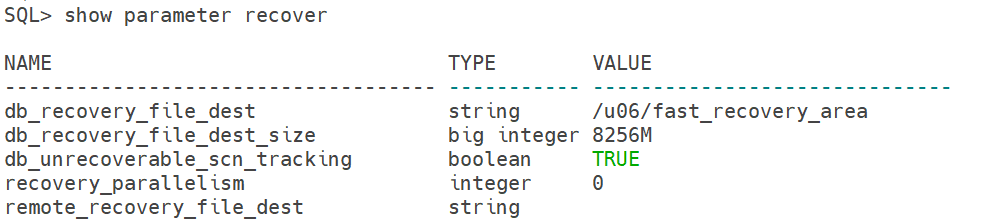
Step 3) Verify Redo Log Configuration
Redo logs are critical for database recovery and transaction processing. As part of the OEM Repository Database preparation, verify the number of redo log groups and members configured in the database.
SELECT * FROM v$logfile;
In this environment, three redo log groups are configured. However, each group contains a single member. For production deployments, Oracle recommends multiplexing redo log files across separate storage locations to provide additional protection against disk failures.
Step 4) Verify Control File Multiplexing
Control file multiplexing provides additional protection against control file corruption or storage failures. Oracle recommends maintaining multiple copies of the control file on separate disk locations to improve database recoverability.
SELECT name FROM v$controlfile;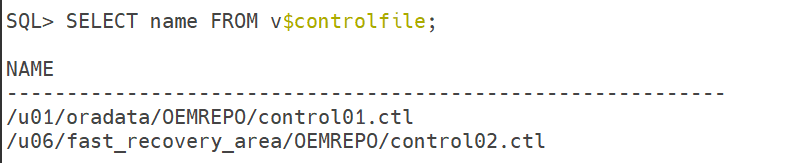
Step 5) Backup of Spfile
create pfile from spfile;Step 6) Verify Flashback Database Configuration
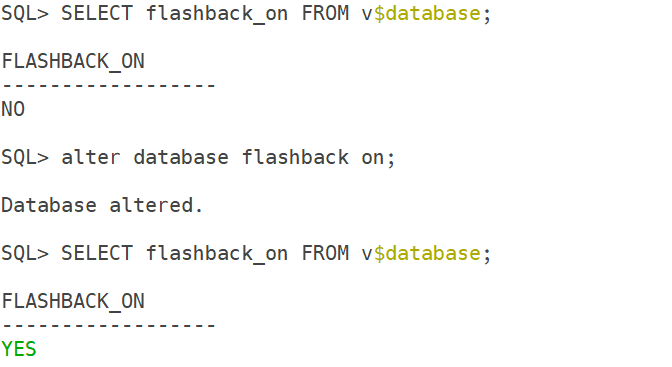
Flashback Database provides the ability to rewind the database to a previous point in time without performing a complete restore and recovery operation. Before proceeding with the OEM installation, verify whether Flashback Database is enabled.
SELECT flashback_on FROM v$database;If Flashback Database is disabled, consider enabling it before installing Oracle Enterprise Manager 13c. This provides an additional recovery option in case configuration changes or installation activities need to be rolled back.
Step 7) Verify Listener Configuration
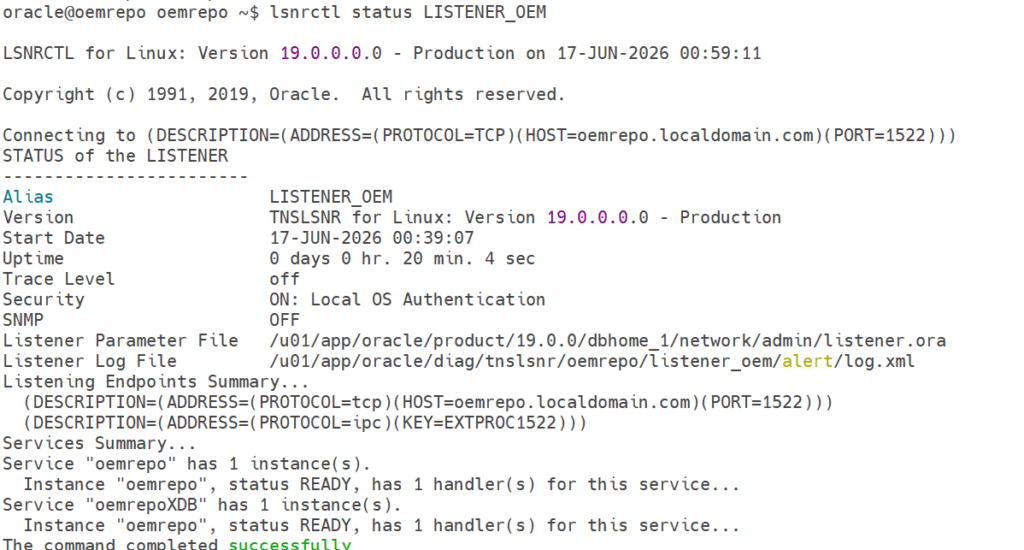
Oracle Enterprise Manager communicates with the repository database through the Oracle Listener. Before proceeding with the OEM installation, verify that the listener is running and that the database service is registered correctly.
In my lab environment, I have configured the listener on a non-default port instead of the standard port 1521. Using a custom listener port can help reduce unnecessary connection attempts and align with security practices followed in many enterprise environments.
In this setup, the listener is configured on port 1522, and the OEM repository database service is registered successfully.
Step 8) Verify Password Verification Function
As part of the OEM Repository Database preparation, verify that password complexity rules are enforced through a Password Verify Function (PVF). This helps prevent the use of weak passwords and improves the overall security of the database environment.
set lines 999 pages 999
col PROFILE for a30
col LIMIT for a30
SELECT profile, resource_name, limit FROM dba_profiles WHERE profile='DEFAULT' AND resource_name LIKE 'PASSWORD%';
In this environment, the PASSWORD_VERIFY_FUNCTION parameter is currently set to NULL, which means password complexity checks are not being enforced. For production environments, consider enabling an Oracle-supplied Password Verify Function or implementing a custom password policy based on organizational security requirements.
Conclusion
In this guide, we successfully prepared the OEM Repository Database for Oracle Enterprise Manager 13c installation. As part of the repository readiness validation, we verified the database configuration, ARCHIVELOG mode, Fast Recovery Area (FRA), control file multiplexing, redo log configuration, Flashback Database settings, listener connectivity, and password security policies.
Performing these prerequisite checks before installing OEM 13c helps identify potential issues early and ensures that the repository database is properly configured for Oracle Enterprise Manager Cloud Control deployment.
With the OEM Repository Database preparation completed successfully, the environment is now ready for the next phase of the OEM 13c Installation Guide series, where we will install and configure Oracle Enterprise Manager 13c Cloud Control.
📚 OEM 13c Installation Guide Series
✅ Part 1 – Oracle Linux 8.10 Installation
✅ Part 2 – Oracle Database 19c Software Installation & Oracle 19c Database Installation
✅ Part 3 – Preparing the OEM Repository Database (Current Article)
⏳ Coming Next:
Part 4 – Oracle Enterprise Manager 13c Cloud Control Installation
👉 View Complete OEM 13c Installation Guide