Table of Contents
Introduction
Kernel Parameters Configuration for OEM 13c is an important prerequisite task that should be completed before starting the Oracle Enterprise Manager 13c Cloud Control installation. Incorrect operating system settings can lead to prerequisite check failures and may impact Oracle Management Service (OMS) deployment during installation.
Oracle Enterprise Manager relies on operating system resources such as file handles, shared memory, and process limits. Verifying these settings before launching the installer helps ensure a stable installation environment and minimizes troubleshooting efforts later in the deployment process.
In this guide, we will review the kernel parameters Configuration for OEM 13c and verify that the Oracle Linux server is configured according to Oracle recommendations.
Note – This article focuses on configuring kernel parameters required for Oracle Enterprise Manager installation.
Before proceeding, ensure the following prerequisites have already been completed:
Oracle Linux 8.10 Installation Guide
Oracle 19c Database Creation for OEM 13c Using DBCA
Preparing the OEM Repository Database for OEM 13c Installation
How to Verify Required OS Packages for OEM 13c Installation
Oracle User Limits for OEM 13c Installation
OEM 13c Cloud Control Installation Guide
Oracle Enterprise Manager installation media can be downloaded from Oracle Software Delivery Cloud, and certification requirements can be reviewed through Oracle Enterprise Manager documentation.
After completing the kernel parameter verification, return to the OEM 13c Cloud Control Installation Guide and continue with the remaining prerequisite checks.
Verify Kernel Parameters Configuration for OEM 13c
Step 1) Verify Current Kernel Parameters
sysctl -p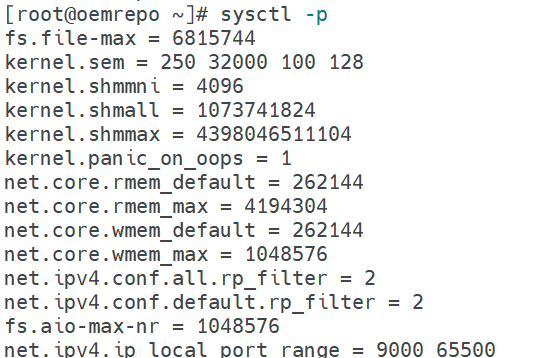
Step 2) Verify fs.file-max Parameter
sysctl fs.file-max
Step 3) Review Oracle Recommended Values
You can also review the Oracle recommended values before proceeding further with the next step.
Step 4) Configure Kernel Parameters
vi /etc/sysctl.conf[root@oemrepo ~]# cat /etc/sysctl.conf
# sysctl settings are defined through files in
# /usr/lib/sysctl.d/, /run/sysctl.d/, and /etc/sysctl.d/.
#
# Vendors settings live in /usr/lib/sysctl.d/.
# To override a whole file, create a new file with the same in
# /etc/sysctl.d/ and put new settings there. To override
# only specific settings, add a file with a lexically later
# name in /etc/sysctl.d/ and put new settings there.
#
# For more information, see sysctl.conf(5) and sysctl.d(5).
# oracle-database-preinstall-19c setting for fs.file-max is 6815744
fs.file-max = 6815744
# oracle-database-preinstall-19c setting for kernel.sem is '250 32000 100 128'
kernel.sem = 250 32000 100 128
# oracle-database-preinstall-19c setting for kernel.shmmni is 4096
kernel.shmmni = 4096
# oracle-database-preinstall-19c setting for kernel.shmall is 1073741824 on x86_64
kernel.shmall = 1073741824
# oracle-database-preinstall-19c setting for kernel.shmmax is 4398046511104 on x86_64
kernel.shmmax = 4398046511104
# oracle-database-preinstall-19c setting for kernel.panic_on_oops is 1 per Orabug 19212317
kernel.panic_on_oops = 1
# oracle-database-preinstall-19c setting for net.core.rmem_default is 262144
net.core.rmem_default = 262144
# oracle-database-preinstall-19c setting for net.core.rmem_max is 4194304
net.core.rmem_max = 4194304
# oracle-database-preinstall-19c setting for net.core.wmem_default is 262144
net.core.wmem_default = 262144
# oracle-database-preinstall-19c setting for net.core.wmem_max is 1048576
net.core.wmem_max = 1048576
# oracle-database-preinstall-19c setting for net.ipv4.conf.all.rp_filter is 2
net.ipv4.conf.all.rp_filter = 2
# oracle-database-preinstall-19c setting for net.ipv4.conf.default.rp_filter is 2
net.ipv4.conf.default.rp_filter = 2
# oracle-database-preinstall-19c setting for fs.aio-max-nr is 1048576
fs.aio-max-nr = 1048576
# oracle-database-preinstall-19c setting for net.ipv4.ip_local_port_range is 9000 65500
net.ipv4.ip_local_port_range = 9000 65500
Step 5) Apply Updated Settings
sysctl -p[root@oemrepo ~]# sysctl -p
fs.file-max = 6815744
kernel.sem = 250 32000 100 128
kernel.shmmni = 4096
kernel.shmall = 1073741824
kernel.shmmax = 4398046511104
kernel.panic_on_oops = 1
net.core.rmem_default = 262144
net.core.rmem_max = 4194304
net.core.wmem_default = 262144
net.core.wmem_max = 1048576
net.ipv4.conf.all.rp_filter = 2
net.ipv4.conf.default.rp_filter = 2
fs.aio-max-nr = 1048576
net.ipv4.ip_local_port_range = 9000 65500Conclusion
In this guide, we successfully verified and configured the Kernel Parameters Configuration for the OEM 13c installation. Proper operating system tuning helps ensure that Oracle Enterprise Manager 13c Cloud Control can access the resources needed during installation and day-to-day operations.
Completing this prerequisite check before starting the OEM deployment reduces the risk of installation failures and helps provide a stable foundation for Oracle Management Service (OMS) components. The server is now ready for the next phase of the OEM 13c prerequisite validation process.